Extract and Analyze Google SERPs With One Click
SERP Extractor & Analyzer - SERP Intelligence extension extracts every ranking page into structured data so you can see patterns, spot gaps, and build content that actually competes.
Copying results manually from Google takes hours
Google shows visual results and not structured data
Comparing multiple ranking pages across tabs is painful
Multi-page SERP datasets are difficult to build by hand
Most SEO research comes down to three simple questions
When you analyze a keyword or study competitors, you are usually trying to answer the same three questions. The problem is that Google shows the results, but it does not give you the structure behind them.
SERP Intelligence extracts the ranking pages directly from the results page and organizes them into clean data you can analyze. From there you can send the results to the SERP Analyzer and compare how every page is built.
Who ranks for this keyword?
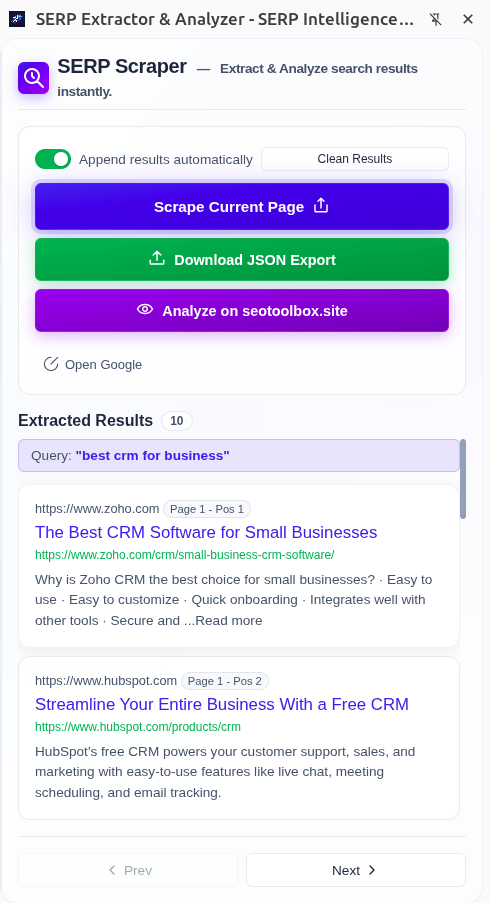
Extract every ranking result from the SERP with its position, domain, URL, title, and snippet in a structured list you can actually work with.
How are those pages structured?
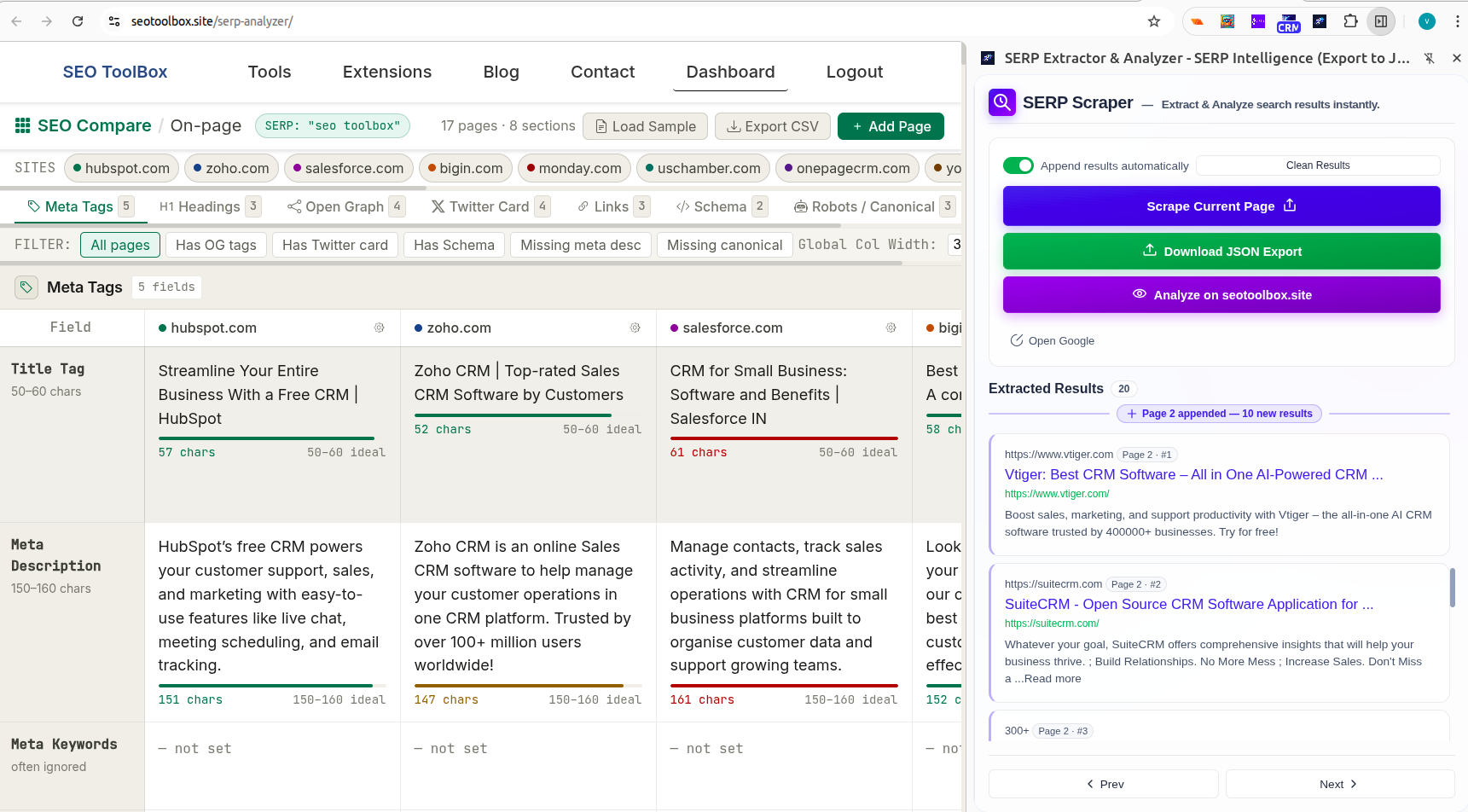
Send the results to the SERP Analyzer to view each page side by side and inspect titles, meta descriptions, headings, and other on page elements.
What does it take to compete?
Identify common patterns across ranking pages and see how the top results structure their content so you know what you need to improve.
Five practical SERP workflows people use every day
Real tasks SEO teams, content teams, and agencies run for research, reporting, and strategy.
Reverse engineer any SERP
Search a keyword, open the panel, and extract every ranking result with one click. Titles, URLs, domains, positions and snippets are captured into a tidy table you can work from. What used to take minutes of manual copying now takes seconds. Use the snapshot to study how top pages structure titles, headings and content.
Most PopularCapture a research ready SERP snapshot
Extract the current results for any query into a clean dataset that includes query, position, title, URL, snippet, domain and breadcrumbs. Save or export the JSON to lock in a reproducible record for reporting and documentation.
Reliable recordScale dataset collection across result pages
Turn on append mode to gather results from page two, page three and beyond while keeping one growing dataset. Move through results with the extension previous and next buttons, no need to use Google pagination. Export or feed the dataset into your tools for clustering or statistical analysis.
Data at scaleBuild content briefs that match what ranks
Pull titles, snippets and visible page signals from the SERP to identify common angles and user intent. Send the extracted URLs to the SERP Analyzer to inspect heading structure, schema and on page elements, then turn those findings into actionable brief items.
Content strategyCompare page structure side by side
Send your extracted dataset to the SEO Toolbox and trigger a URL level scrape for each ranking page. The Analyzer lines up titles, meta descriptions, headings and schema so patterns and gaps are obvious at a glance.
Deep analysisCompare what every ranking page is doing. All in one view.
When you send your extracted results to our SERP Analyzer, every ranking page is laid out side by side. You can read the title tag, meta description, heading structure and schema markup of all your competitors simultaneously. No switching tabs and no manual copying.
- Title tags and meta descriptions for every ranking page
- Full heading structure from H1 through H6
- Schema markup and canonical tags per page
- Gap highlighting so you instantly see what your page lacks
Your SERP data, structured and ready to use anywhere
Every result exports as a clean JSON object with consistently named fields. Use it in automated reports, analysis workflows, or feed it directly into your own tools.
Append mode lets you build multi page datasets before exporting so you can capture dozens of ranking pages in a single file, all tagged with the original search query.
{
  "query_string": "best shoes",
  "total_results": 9,
  "extracted_at": "2026-03-15T08:27:24.351Z",
  "pages_scraped": [1],
  "results": [
    {
      "title": "Top 10 Best Shoe Brands in India in 2026",
      "url": "https://www.walkaroo.in/blogs/all/top-10-best-shoes-brands-in-india?srsltid=AfmBOoo7RDKzGm__0twUNwmtatmxt97-A0gw6MV8mBp0obAJel5SLwy6",
      "siteName": "https://www.walkaroo.in",
      "breadcrumb": "https://www.walkaroo.in › blogs › all › top-10-best-shoe...",
      "date_published": "",
      "snippet": "21 Jul 2025 — Top 10 Shoes Brands in India in 2026 · 1. Walkaroo · 2. Bata · 3. Puma · 4. Adidas · 5. Nike · 6. Sparx · 7. Liberty · 8. Red Tape.",
      "query": "best shoes",
      "page": 1,
      "position": 5
    }
  ]
}From Google search to a full SERP data in seconds
Install the extension, run a normal Google search, and extract the entire results page with one click.
Install from Chrome Web Store
Add SERP Intelligence to Chrome in seconds. No account and no setup required.
Search any keyword on Google
Run your search normally on Google. Open the extension to reveal the side panel.
Click “Scrape current page”
The extension captures every ranking result including titles, URLs, snippets, domains and positions.
Export or analyze your dataset
Download your data as JSON or send it directly to our SERP Analyzer for deeper competitor insights.
Built for every kind of SEO work
Whether you're a solo blogger or running campaigns for 50 clients, SERP Intelligence fits into your workflow.
SEO Specialists
You need to analyze ranking patterns fast, without spending half your day in spreadsheets. Extract a full SERP in seconds and get straight to the insight.
Content Marketers
You want to write content that ranks - not just content that sounds good. SERP data tells you what Google actually rewards before you write a single word.
SEO Agencies
You run SERP research for multiple clients and can't afford to waste time on manual data collection. JSON exports fits directly into your reporting workflows.
Startup Founders
You need organic growth but don't have a full SEO team. Get a clear picture of who dominates your niche and where the gaps are without paying for expensive tooling.
Keyword Researchers
When you analyze dozens or hundreds of keywords, opening and copying SERPs one by one becomes painfully slow. Extract each results page in seconds and build a dataset you can actually work with.
Common questions
How to collect Google SERP data?
You can use our free SERP Intelligence Extension to quickly scrape results from single or multiple Google search result pages. It is completely free to use and does not require any account. Simply install it in your browser and capture data with a single button click.
What data does SERP Intelligence Extension extract?
For every organic result on the page it captures the title, URL, ranking position, snippet, domain, breadcrumb path and the search query itself. Each result is exported with consistently structured fields.
Can I collect data across multiple Google pages?
Yes. Append mode is enabled by default. After scraping page one, you can move to page two, three, four and beyond. Each time you click the "Scrape current page" button, the results are added to your existing dataset. You can see them appear instantly in the extension sidebar and when you're finished, export the entire dataset as a single JSON file.
What format is the exported data in?
Everything exports as a structured JSON dataset where each result is its own object with clearly labeled fields. It can be opened in spreadsheet tools, imported into databases or processed with scripts.
What is the side by side analysis feature?
After extracting SERP data, you can send the results to our SERP Analyzer directly from the extension sidebar by clicking the “Analyze on seotoolbox.site” button. The analyzer loads each ranking page and collects important on page elements such as title tags, meta descriptions, heading structure and links. All pages are then displayed side by side in a single view so you can quickly spot patterns and see what top ranking pages are doing differently.
Is SERP Intelligence completely free?
Yes. The Chrome extension is free to install and use with no account required. You can extract and export SERP data to JSON at no cost.
Does it work across different regions and languages?
Yes. The extension reads directly from the Google search results page loaded in your browser, so it works across all regions and languages supported by Google.
How do I create better content based on Google search results?
Analyze the top ranking pages for your keyword, identify common patterns in titles and structure, and use those insights to create content that matches search intent and competes effectively.
Extract the full SERP and see what top ranking pages are doing differently.
Free to install. No account needed. Your first SERP dataset is ready the moment you run your next Google search.
Add to Chrome — It's Free