Extract the Data Behind AI Answers and Study What Actually Gets Picked
AI Answer Extractor Extension captures cited sources, query fanout, and full AI answers from ChatGPT and Gemini conversations. Export structured JSON or send results to AIResultIQ for deep GEO analysis.
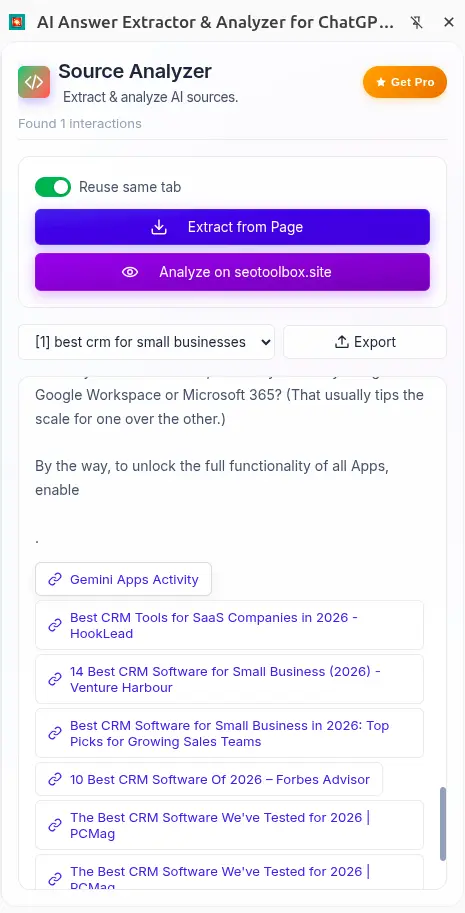
Sources are scattered and easy to lose across multiple prompts
No clear view of how your original query expands behind the scenes
Copying links and responses manually breaks your workflow
No structured data to analyze patterns across conversations
Hard to compare what AI recommends without rebuilding everything yourself
GEO research comes down to three fundamental questions
When you want to appear in AI answers, you need to understand how those answers are built, which sources they draw from, how the query is interpreted, and what content patterns AI systems consistently surface.
AI Answer Extractor captures this data directly from your AI conversations and organizes it into a clean, structured format. You can then send the extracted sources to AIResultIQ to study the on-page signals of every cited page side by side.
Which pages does AI recommend for my topic?
Extract every cited source from an AI answer with its URL and context. Build a clear picture of who is getting referenced and where your content stands.
How is AI interpreting and expanding my query?
Capture the query fanout, the sub questions AI generates internally, to understand how your topic is being decomposed and which angles you may be missing.
What do the cited pages have in common?
Send extracted sources to AIResultIQ to compare title tags, headings, schema and structure of every recommended page at once and spot the patterns that matter.
Every key element of an AI answer, captured
The extension reads directly from the AI conversation in your browser and organizes the data into consistently labeled fields ready for export or analysis.
User Question
The exact query you submitted to the AI. Captured as-is so you have a precise record of what triggered each answer.
Query Fanout
The sub-questions AI generates to answer your prompt. This reveals how the model interprets and expands your query before forming a response.
Final AI Answer
The complete response generated by the AI. Stored alongside the sources so you can relate the answer back to its supporting pages.
Cited Sources
Every URL referenced in the AI answer. These are the pages the model chose to surface, making them the most actionable data for any GEO strategy.
Five practical GEO workflows powered by real AI data
Research tasks that SEO teams, content strategists, and agencies run to understand and improve their AI visibility.
Reverse engineer AI source selection
Ask a question on ChatGPT or Gemini, open the panel, and extract every cited source in seconds. Titles, URLs and query context are captured into a structured list you can act on. Understand which domains AI trusts for your topic and why your content may not be among them.
Most PopularMap query fanout for content gaps
Capture the sub-questions AI generates for your topic to reveal every angle the model considers relevant. Use the fanout map to identify which related questions your content is not addressing, and build pages that cover the full scope of the topic.
Content strategyExport clean data for individual interactions
Select any prompt from the dropdown and export its question, answer, query fanout, and cited sources as structured JSON. Each export is tied to a single interaction, making it easier to work with precise, usable data instead of messy conversation logs.
Clean dataAnalyse what AI recommends for competitors
Ask AI about your competitors or their product categories and extract which sources it cites. Send those URLs to AIResultIQ to inspect their content structure and identify what signals are making those pages rank in AI answers.
Competitor researchCompare cited pages side by side
Send your extracted sources to AIResultIQ directly from the extension sidebar. The platform fetches each page and lines up title tags, meta descriptions, headings and schema so you can see exactly what the AI-recommended pages share in common.
Deep analysisGo from extracted links to actual page understanding
Once you send sources from the extension, AIResultIQ loads each cited page and lines them up in a single view. Instead of opening tabs and jumping between pages, you can study everything side by side in a structured format.
You can quickly scan how each page is built, from titles and meta descriptions to heading structure up to H3, along with signals like canonical tags, robots directives, Open Graph data, and how links and images are used across pages.
- Titles, meta descriptions, and heading structure up to H3
- Canonical, robots directives, and Open Graph tags
- Internal links, external links, and image references
- A simplified version of each page for quick scanning and comparison
Works directly with the extension
The extension captures structured data from AI conversations. AIResultIQ picks up from there and handles the analysis. You move from extraction to comparison without rebuilding anything manually.
Learn more about AIResultIQ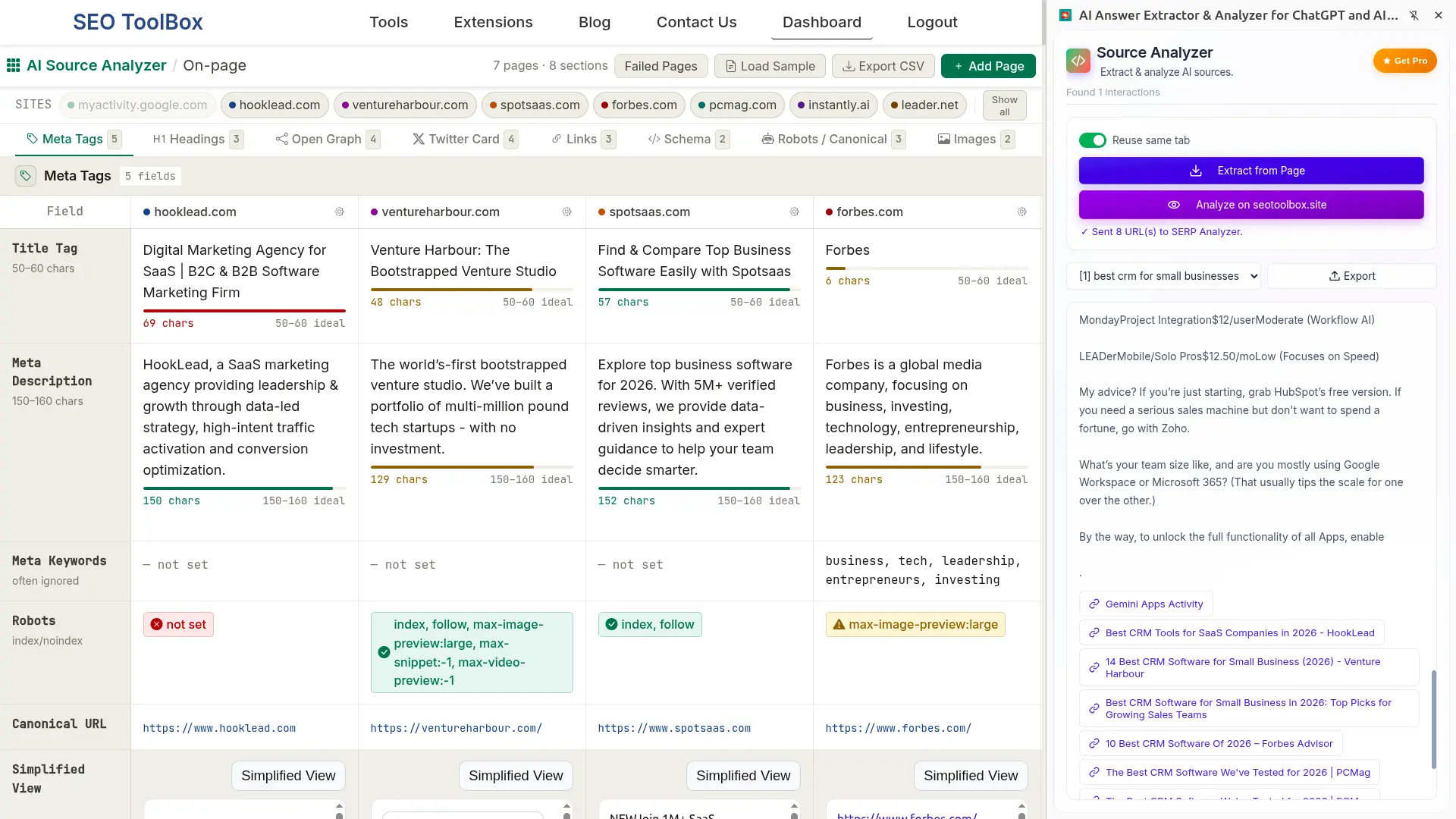
Capture exactly what the AI said and use it your way
Extract any interaction from a conversation and turn it into structured data you can actually work with.
When you click extract, the extension captures the full conversation and organizes every prompt into a simple dropdown. You can switch between questions, review how each answer was built, and export only the interaction you care about.
No noise. No manual copying. Just clean, structured data ready for analysis or further processing.
{
  "metadata": {
    "title": "Best CRM for SMBs",
    "extracted_at": "2026-04-26T17:42:18.913Z"
  },
  "conversation": {
    "question": "find me 10 best crm for small businesses",
    "fanoutQueries": [
      "best CRM software small business 2026"
    ],
    "answerBlocks": [
      {
        "type": "text",
        "content": "Here are 10 of the best CRM tools...",
        "sources": [
          {
            "url": "https://example.com",
            "title": "Example Source"
          }
        ]
      }
    ]
  }
}From AI conversation to structured GEO data in seconds
Install the extension, have a normal conversation with ChatGPT or Gemini, and extract all cited sources with one click.
Install from Chrome Web Store
Add AI Answer Extractor to Chrome in seconds. No account and no setup required.
Ask a question on ChatGPT or Gemini
Use the AI platform as you normally would. The extension runs in the background and is ready whenever you need it.
Click Extract in the sidebar
The extension captures the question, query fanout, full answer and all cited sources from that interaction.
Export JSON or analyze sources
Download your data as JSON or send the cited URLs directly to AIResultIQ for side-by-side on-page analysis.
For people who want to understand why AI recommends certain content
If you're trying to figure out how AI answers are built and what gets cited, this fits directly into how you already research.
GEO and SEO Practitioners
You are not guessing what works in AI answers. You are verifying it. Extract real citations, query fanout, and answer structure to see which pages consistently show up and why.
Content Teams
Before writing, you can see what AI already prefers. Understand how answers are structured, which sources are used, and what coverage actually gets picked up.
Agencies and Consultants
Clients are asking about AI visibility. This gives you actual data instead of opinions. Export structured interactions or push them into your workflow for deeper comparison and reporting.
Founders and Operators
You want to know if AI recommends your product or someone else’s. Run real queries, extract the results, and quickly see where you stand in your category.
Questions you may have
How do I analyze the sources AI uses without opening every link?
This is exactly the problem AI Answer Extractor solves. Instead of manually opening each cited link from an AI answer, you can extract all sources in one click and work with them as structured data.
If you want to go deeper, you can send those sources to AIResultIQ to view all pages side by side and compare their content, structure, and patterns without switching tabs.
Why do AI tools like ChatGPT recommend certain websites?
AI systems do not “choose” websites the way a human would. Most modern AI tools combine two things: their trained knowledge and external retrieval systems like search indexes or web APIs when needed.
For many queries, the model breaks your question into multiple sub-queries, searches for relevant content, and then selects a small set of sources that best support the final answer. These are usually pages that are clear, well-structured, and considered trustworthy or authoritative.
The final answer is then generated by combining and summarizing information from those sources, not copying a single page.
AI Answer Extractor helps you see this process more clearly by capturing the query fanout, the selected sources, and the full answer, so you can understand what actually influenced the response.
Can I extract data from multiple prompts in the same chat?
Yes. When you click extract, AI Answer Extractor captures the entire conversation. Each prompt is organized in a dropdown, so you can switch between interactions and export only the one you need.
This is useful when you are testing multiple variations of a query and want to compare how the answers and sources change.
What is query fanout and why does it matter?
Query fanout is the set of related sub-queries AI systems generate internally to build an answer. It shows how the model expands a question behind the scenes.
AI Answer Extractor captures these queries so you can understand coverage gaps, hidden intent, and how broad your content needs to be to get cited.
What is the difference between AI Answer Extractor and AIResultIQ?
AI Answer Extractor is used inside AI tools like ChatGPT and Gemini. It captures the conversation, including questions, answers, and cited sources.
AIResultIQ is where you analyze those sources in depth. It fetches the actual pages and lets you compare them side by side to study what makes them get recommended.
In simple terms, the extension collects the data, and AIResultIQ helps you analyze it.
Can I just copy sources manually instead of using AI Answer Extractor?
You can, but it gets slow very quickly. AI answers often include multiple sources across multiple prompts, and copying them manually does not capture query fanout or answer structure.
AI Answer Extractor organizes everything automatically, so you do not lose context and can reuse the data without extra work.
How can I check if my website is being recommended by AI?
The most reliable approach is to test real queries related to your topic and review both the answers and cited sources. Since there is no official ranking report for AI systems, visibility has to be evaluated by observing results across multiple prompts and variations.
Modern AI systems generate answers using a mix of pre-trained knowledge and external retrieval. For many queries, they expand the question into related sub-queries, retrieve relevant documents from web indexes, and then synthesize an answer from those sources.
Because of this, whether your website appears depends on several factors:
whether your content is indexed or accessible to those retrieval systems
how relevant it is to different variations of the query
how clearly it answers the intent behind those queries
In addition, some AI systems can personalize responses based on context such as your language, prior interactions, or saved preferences. Memory features can store details about a user and influence future responses, although this varies by platform and user settings.
In practice, this means you should test multiple queries, from different angles and contexts, and look for patterns over time rather than relying on a single result.
What can I do with the exported JSON data?
The exported data can be used for analysis, reporting, or building datasets. You can store it, process it programmatically, or review it later without revisiting the original conversation.
Many users also use it to compare multiple queries and identify which sources appear consistently across different prompts.
Does AI Answer Extractor work automatically on every page?
No. You control when to extract. The extension only captures data when you click extract, so you can choose exactly which conversations and prompts to include.
Which platforms are supported?
AI Answer Extractor currently supports ChatGPT and Gemini. You use these platforms normally, then extract the data from the conversation when needed. Support for Claude and Perplexity is coming soon.
Is AI Answer Extractor free to use?
Yes. AI Answer Extractor is free to use. You can install it directly from the Chrome Web Store and start extracting data immediately. No account or login is required.
Reverse engineer what goes into an AI answer
Capture the queries, sources, and final output to understand what influenced the response. Review different prompts, compare sources side by side, and see patterns across answers instead of relying on a single result.
Add to Chrome — It's Free